
Industrial Information Hub
What is IIH?
Industrial Information Hub (IIH) is an industrial data operations solution. It serves as an integration layer for industrial data and bridges the gap from the shop floor, through other levels, up to the cloud. Using the collected data from shop floor devices it provides information to other services and systems with its capabilities in structuring, transforming, storing and synchronizing the data. This enables access to data on all levels in a multitude of possibilities.
The IIH can be used, together with other components, to integrate manufacturing data from the shopfloor all the way up to the cloud.
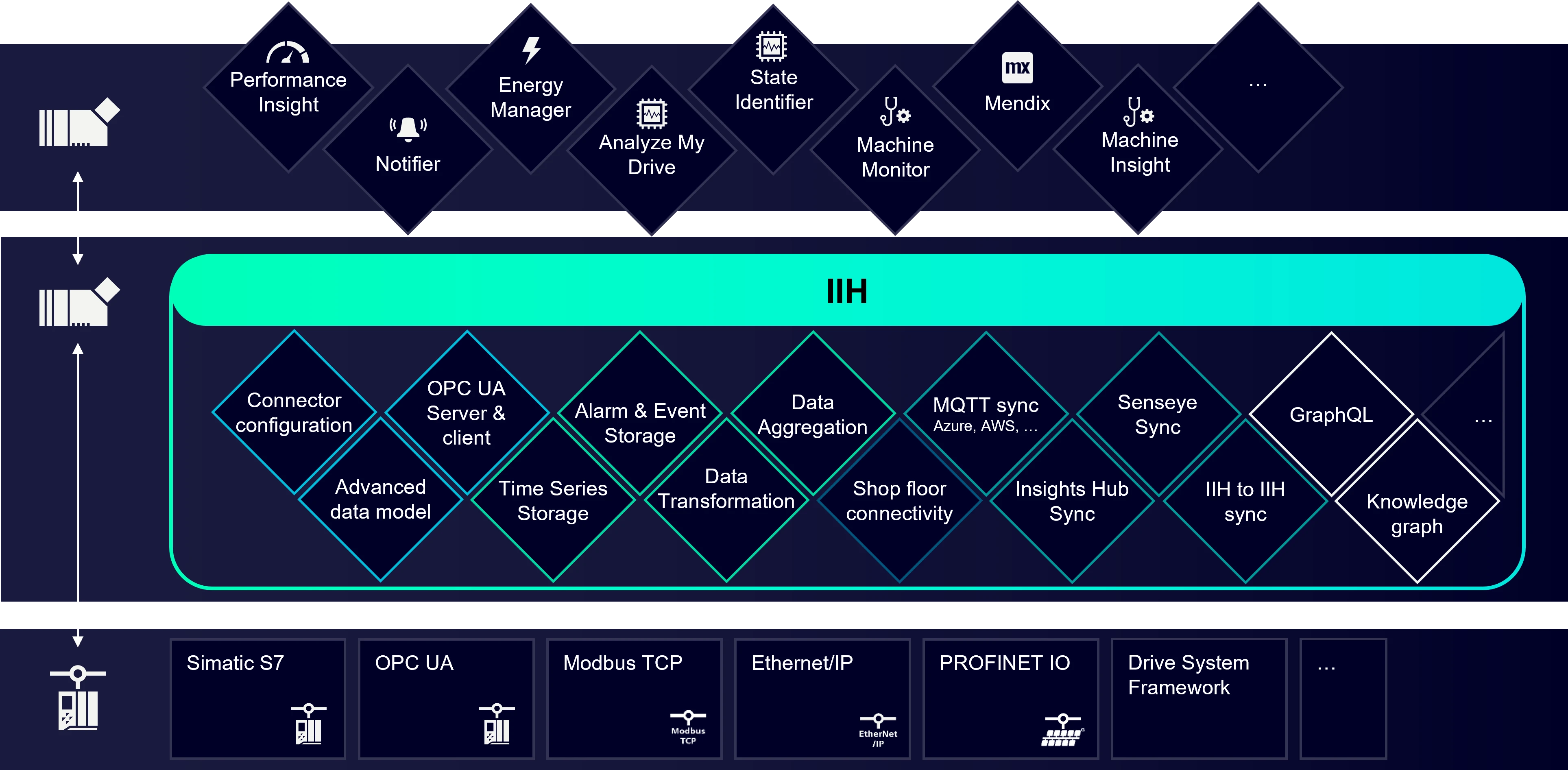
Dive deeper into the details with our full IIH user documentation. Below, you'll find a quick summary of the components that make up IIH.
Common Configurator
Common Configurator represents the central user interface for Industrial Information Hub and all Industrial Edge connectors. With Common Configurator you can configure connectors, Industrial Edge Databus, IIH Essentials and IIH Semantics. Common Configurator can also be used outside the IIH with limited functionality.
IIH Essentials
IIH Essentials acts as the database for IIH. It provides configuration and storing of advanced models. Data received from connectors is structured using the model and stored in its IoT-Database. The data may be transformed and aggregated before providing it to clients through various interfaces. Its API is the basis for other apps like Performance Insight and many more. Additionally, IIH Essentials can actively synchronize the model and data to various clouds.
Essentials can be used as a standalone-app for a deployment on small devices.
IIH Semantics
IIH Semantics adds semantic functionalities to the IIH solution. It enables querying the advanced model and data through GraphQL by using a knowledge graph. An OPC UA server makes it possible to share data and information within IIH with OPC UA clients. Similarly it is possible to connect to an OPC UA server, or load a companion spec for easy configuration and integration into existing OPC UA configurations.
Connectors
IIH enables different connectors to be configured on a user interface. There are a variety of connectors that work with IIH. IIH connectors are not covered by this documentation. You can find information on the connectors here.
Basics of IIH
Data flow
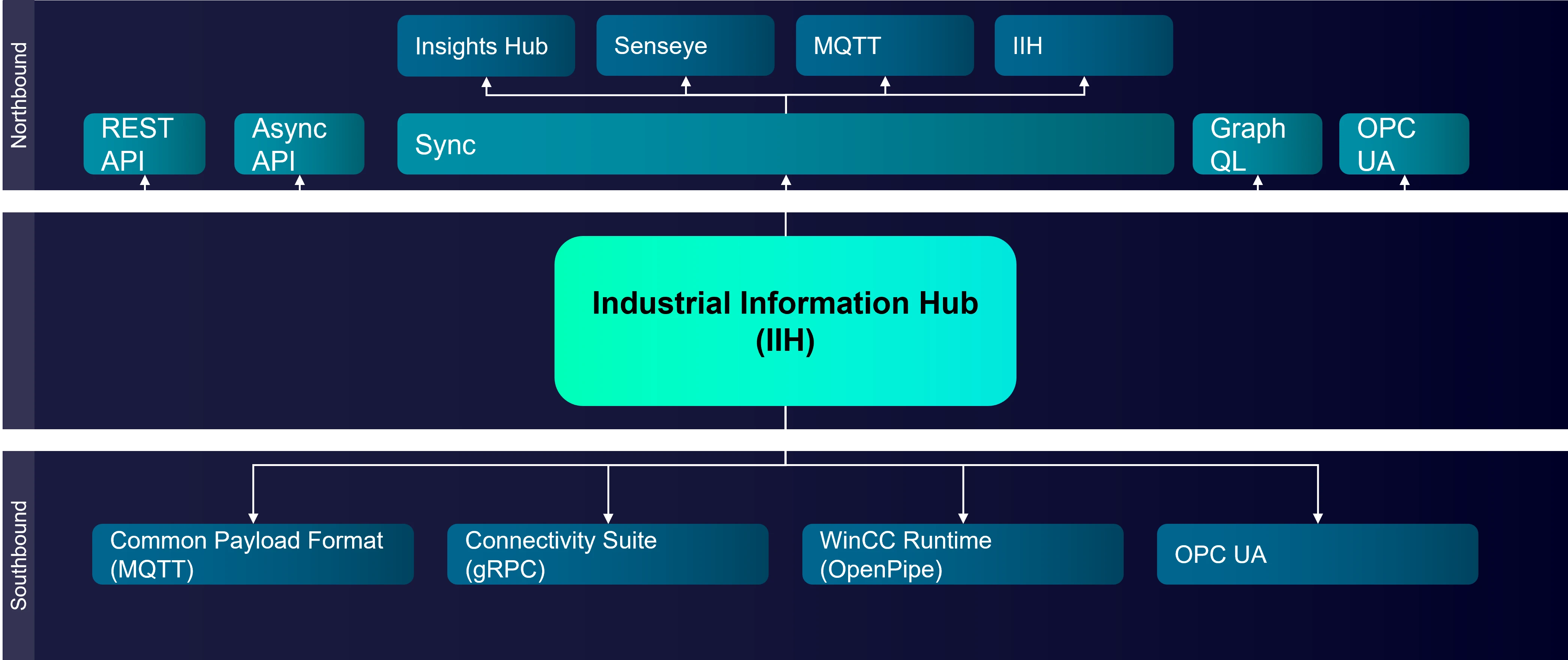
Data can be collected through the southbound interfaces: MQTT via IE Databus, Connectivity Suite, OPC UA and WinCC Runtime through OpenPipe. OPC UA and OpenPIpe do not require a connector in IIH as it is integrated.
To set up your data connection:
- Configure a connector, such as a SIMATIC S7+ Connector, and select which tags should be available within the system
- Map tags of the connector directly to an attribute in the asset model or create a transformed attribute on basis of the tags
- After mapping, the data of the tags is available to all IIH features such as:
- OPC UA server
- Northbound synchronization
- Knowledge graph
- Historical data, available to clients like Performance Insight
- ...
Connection to OPC UA server
If you want to establish a connection to an OPC server, install Common Configurator and IIH Semantics. The first step is to load a server structure for OPC UA. You can create your own structure using any modelling software for OPC UA, such as SiOME or UA Expert, and then import it into IIH.
Connectivity Suite and IIH-compatible connectors
The latest generation of connectors follows the Siemens "Connectivity Suite" standard, providing a central configuration in Common Configurator. In addition to Connectivity Suite connectors, there are older generation connectors available that do not follow the "Connectivity Suite" standard but still can be configured using Common Configurator. All other connectors are not compatible with the connector configuration of Common Configurator, but their data can still be used in IIH.
APIs
The IIH offers the following interfaces for other components to use:
REST API (IIH Essentials) - the interface to access the entire configuration of IIH Essentials, the asset model, time series data and alarms.
OPC UA Server (IIH Semantics) - the IIH Semantics offers an integrated OPC UA Server for read and write access to the configured model.
Graph QL API (IIH Semantics) - an API for retrieving model data as well as live and historical time series data via the GraphQL query language.