Examples for API Usage
Python
You can use Python to get and post data to Optimize my plant.
import requests
from datetime import datetime

# replace eu1 with the correct region (eu1, us1, ap1)
# Endpoint to request a token (valid for 30min)
auth_url = "https://ompprod.eu1.sws.siemens.com/oauth/token"
base_url = "https://cloud.eu1.sws.siemens.com/api/optimizemyplantapi/v1/omp"

# Note: The client_id and client_secret can be obtained from the Xcelerator Admin Console
# by creating a Server User for Optimize my plant
client_id = "<your client_id>"  # replace with your client_id
client_secret = "<your client_secret>"  # replace with your client_secret

payload = 'grant_type=client_credentials&client_id=' + client_id + '&client_secret=' + client_secret
headers = {
  'Content-Type': 'application/x-www-form-urlencoded'
}

response = requests.request("POST", auth_url, headers=headers, data=payload)

if response.status_code != 200:
  print ('Error' + str(response.status_code))
  exit()

# If the response is successful, extract the token and its expiration time
Token = response.json()['access_token']
# Token_expires_in is the number of seconds until the token expires
Token_expires_in = response.json()['expires_in']
# Calculate the expiration timestamp
Token_expires = datetime.now().timestamp() + Token_expires_in
# if you reuse the token for multiple requests, you can check if the token is still valid
# by comparing the current timestamp with Token_expires

headers.clear() # reusing previous headers variable, clear it
# build the header with the bearer token
# set that the result should be in JSON format (XML is not supported)
headers = {
  'Accept': 'application/json',
  'Authorization': 'Bearer ' + Token
}

# this is the API to retrieve the list of projects
url = base_url + "/projects"

payload = {}
response = requests.request("GET", url, headers=headers, data=payload)

if response.status_code != 200:
  print ('Error' + str(response.status_code))
  exit()

print(response.json())
Plant Simulation Simtalk
You can use httpGetRequest or httpPostRequest in Plant Simulation Methods to get or post data to Optimize my plant. Here is an example to get the list of Projects
var strBaseAuthURL:string = "https://ompprod.eu1.sws.siemens.com/oauth/token"
var strBaseURL:string = "https://cloud.eu1.sws.siemens.com/api/optimizemyplantapi/v1/omp"
var strClientId:string = "<your client_id>"
var strClientSecret:string = "your client_secred"
var jsonRequestHeaderAuth:json
var jsonRequestHeader:json
var strRequestBody:string
var strBearerToken:string
var anyResponseBody:any;
var jsonResponseHeader:json;
var jsonResponseBody:json;
var nExpiresIn:Integer
var nResult:integer

// get Token
jsonRequestHeaderAuth["Content-Type"] := "application/x-www-form-urlencoded";
strRequestBody := to_str("grant_type=client_credentials&client_id=", strClientId, "&client_secret=", strClientSecret)

nResult := httpPostRequest(strBaseAuthURL, strRequestBody, jsonRequestHeaderAuth, jsonResponseHeader, jsonResponseBody)

if nResult != 200 then
  print nResult
  return
end

// got token
strBearerToken := "Bearer " + jsonResponseBody["access_token"]

// build header with Authorization token
jsonRequestHeader["Authorization"] := strBearerToken;

// Endpoint to get project details
var strURL:string = strBaseURL + "/projects"

// json Arrays as Response must be of Simtalk type any
nResult := httpGetRequest(strURL, anyResponseBody, jsonRequestHeader, jsonResponseHeader)

if nResult != 200 then
  print nResult
  return
end

print anyResponseBody
Microsoft Power Query (for Excel or Power BI)
You can use Power Query in Excel or Power BI to get and analyze data from Optimize my plant, e.g. KPI results from scenarios. Copy&paste this code into Advanced Editor in Power Query. Make sure to replace client_id and client_secret with the Server User details. You might also have to update the two base-URL's and replace eu1 with the correct region (eu1, us1, ap1).
let
    TokenHeaders = [#"Content-Type"="application/x-www-form-urlencoded", #"Accept" = "*/*", ForceRefresh=Text.From(DateTime.LocalNow())],
    TokenPostBody = [
        grant_type="client_credentials",
        client_id="<your client_id>",
        client_secret="<your client_secret>"
    ],
    TokenJsonResponse = Json.Document(Web.Contents("https://ompprod.eu1.sws.siemens.com/oauth/token", [Timeout=#duration(0, 10, 0, 0), Headers=TokenHeaders, Content=Text.ToBinary(Uri.BuildQueryString(TokenPostBody))])),
    BearerToken = TokenJsonResponse[access_token],
    Headers = [#"Content-Type"="application/json;charset=utf-8", Authorization="Bearer " & BearerToken],
    RelativePath = "/projects",
    jsonResponse = Json.Document(Web.Contents("https://cloud.eu1.sws.siemens.com/api/optimizemyplantapi/v1/omp", [Timeout=#duration(0, 10, 0, 0), RelativePath=RelativePath, Headers=Headers])),
    #"Converted to Table" = Table.FromList(jsonResponse, Splitter.SplitByNothing(), null, null, ExtraValues.Error),
    #"Expanded Column1" = Table.ExpandRecordColumn(#"Converted to Table", "Column1", {"ProjectId", "ProjectName", "Description", "OrganizationId", "OrganizationName", "IsSandboxProject"}, {"ProjectId", "ProjectName", "Description", "OrganizationId", "OrganizationName", "IsSandboxProject"}),
    #"Changed Type" = Table.TransformColumnTypes(#"Expanded Column1",{{"ProjectName", type text}, {"ProjectId", type text}, {"Description", type text}, {"OrganizationId", type text}, {"OrganizationName", type text}, {"IsSandboxProject", type logical}})
in
    #"Changed Type"
Node Red (for Insights Hub Visual Flow Creator)
Use Insights Hub to send KPI's to Optimize my plant
From Visual Flow Creator you can create a flow that pushes KPI's (e.g. OEE) from Insights Hub to Optimize my plant. In Optimize my plant you can then use the data from Insights Hub to compare with predicted (simulated) data to see where the prediction still needs to be improved This Flow is an example of how to send (OEE) KPI details to Optimize my plant: 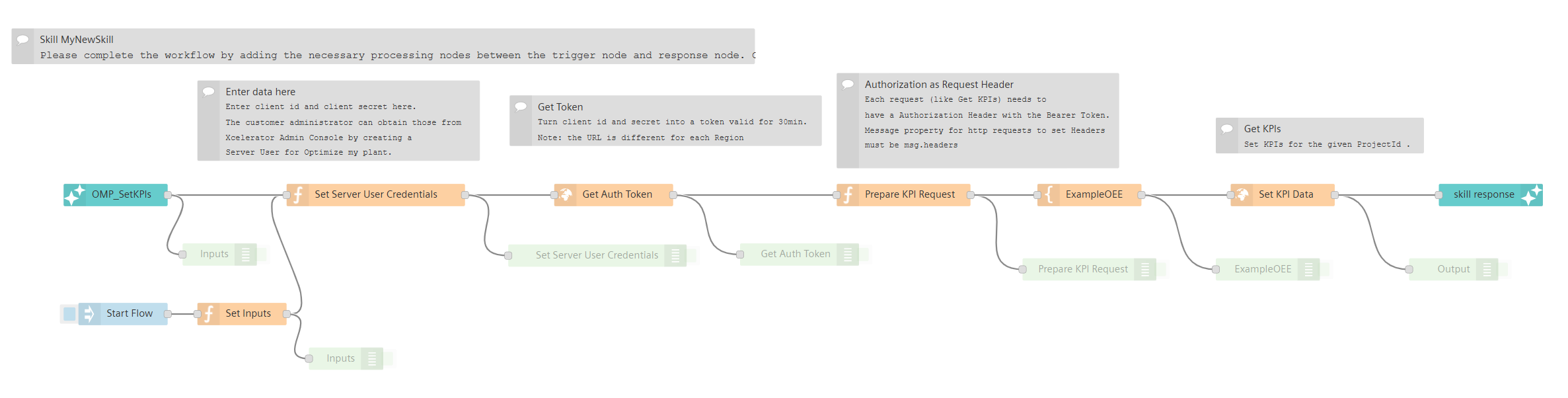
Download Node Red flow example to send KPIs
Use Insights Hub to send updated Availability and MTTR data to Optimize my plant
From Visual Flow Creator you can create a flow that pushes Availability and MTTR details (from OEE module) from Insights Hub to Optimize my plant. In Optimize my plant the updated availability and MTTR data will be used to improve simulation accuracy by using measured values from production rather than assumptions. This Flow is an example of how to send Failure details to Optimize my plant: 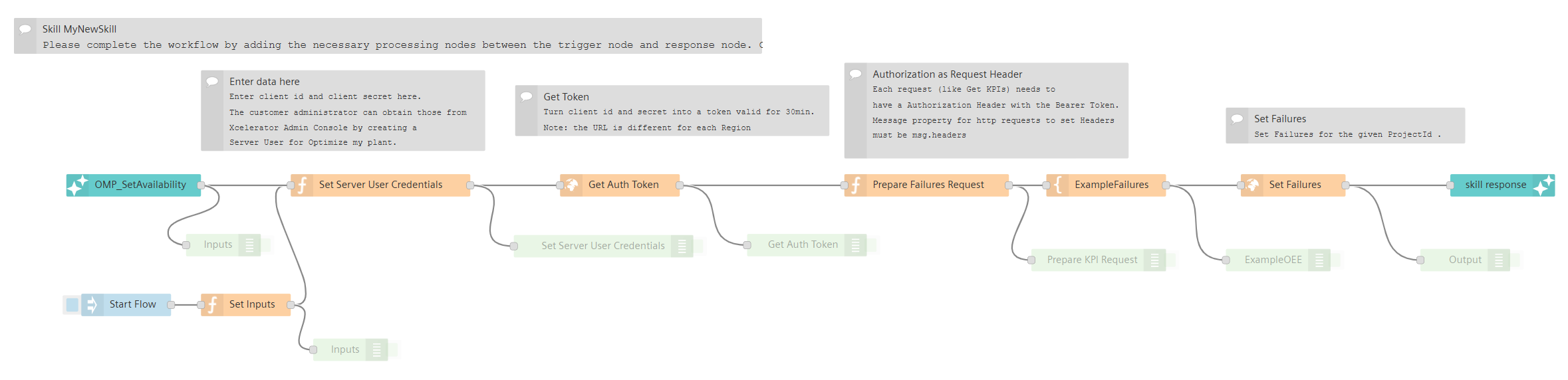
Download Node Red flow example to send Failures
Build your own AI Agent for Insights Hub using Copilot Studio
From Copilot Studio you can create additional custom skills and e.g. leverage data from Optimize my plant. Insights Hub Copilot Studio
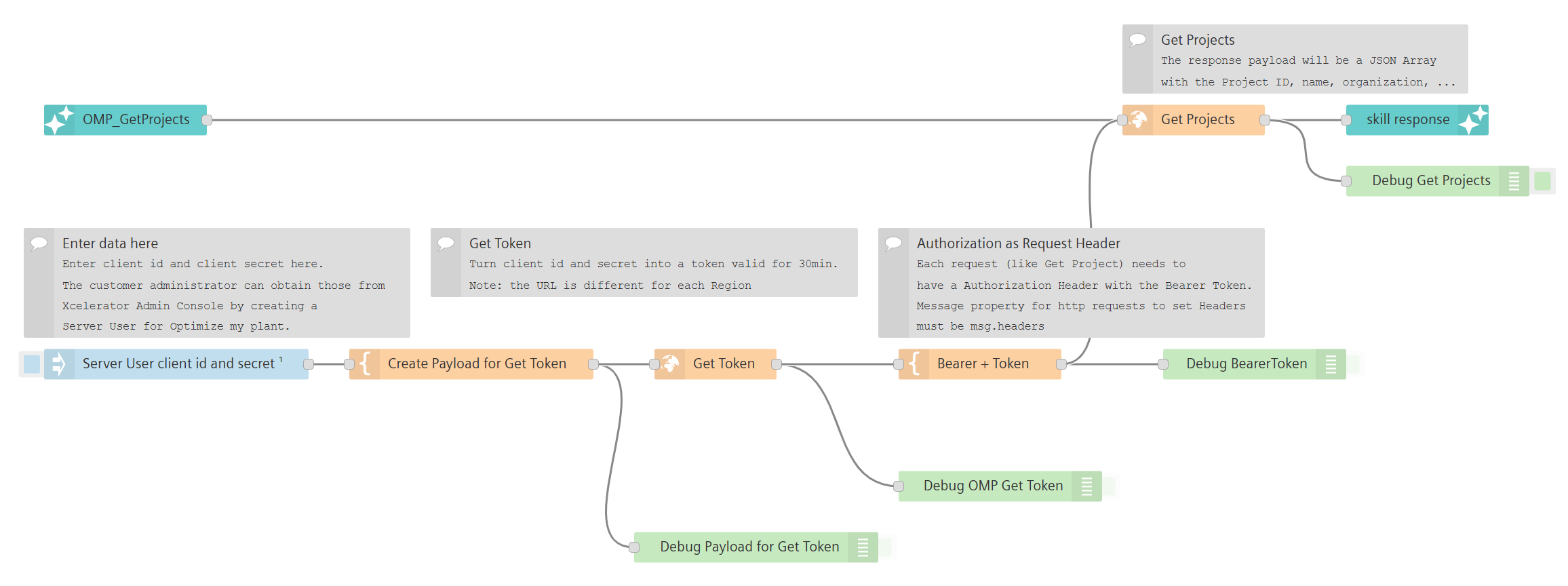
This Flow is an example of how to read Project details from Optimize my plant: