
Requesting a new component
With a huge amount of components in its database, chances are that most components you wish to add to your monitoring lists already exist within Vilocify. It can nonetheless happen that you aren't able to find the desired component, for example, because it's a rather obscure piece of software or a newly released version.
In such cases you are free to request new components through our request form. Once you submit your request, the Vilocify team will analyze it in order to ensure that a correct and reliable vulnerability monitoring is possible. This usually takes a few business days. Once your request is successfully processed, you will be alerted by a message in your inbox and can finally add the new component to your monitoring list. In case the Vilocify team wasn't able to successfully process your request, you will be alerted by a message in your inbox with clear instructions on how to proceed.
To ensure that the component request process runs smoothly, be aware of the following guidelines.
High level approach
The goal of our component request process is to add components to the Vilocify database in such a way, that they reflect the naming conventions used in official vendor advisories. This guarantees that we can reliably match relevant security information from the many sources in our monitoring, to the affected components. Failing to follow these conventions could lead to potentially missing out on relevant information.
Components suitable for security vulnerability monitoring
Not all components are suitable for security monitoring. It's therefore important to understand which types of components can be properly monitored.
Valid components
- Valid are in general all components which are publicly visible. That means, they can be found or identified clearly by using an internet search engine such as Google. Only if a component is externally visible security vulnerability information can be expected from the various information sources. Examples:
Microsoft Windows 10 Version 22H2Red Hat Enterprise Linux Server 8Mozilla Firefox 109.0GNU glibc 2.37Cisco IOS Software 15ISC Bind 9.18.11DENX Software Engineering u-boot v2023.04-rc1(see remark about beta versions further below)
- Hardware elements with the exact hardware model as well as the firmware / software version running on that hardware. Examples:
IOS XE on Catalyst 9200 Series Switches (All Versions)SIMATIC S7-1510SP-1 PN CPU
- Drivers for a hardware component need to be explicitly defined. They won't be automatically assigned to an operating system. Examples:
NVIDIA NVS300 Graphics Driver 191.87Alcor Micro USB Smart Card Reader Driver (All Versions)
- Optional plug-ins, modules, add-ons and extensions for a framework, browser or software application need to be explicitly registered. Examples:
NuGet Package Newtonsoft.Json 13.0.2AdBlock Firefox AdBlock add-on 5.3.3Benjamin Trott Perl Module Crypt::DES_EDE3 0.01
- Packages from operating systems. While Vilocify recommends monitoring operating systems as a whole, it's also possible to request specific packages of Linux distributions. Packages can only be monitored for all versions but not version specific. Packages can also be monitored for specific versions of distributions. Examples:
RHEL Package: telnet All VersionsDebian Package: apt All VersionsDebian 11 Package: bind9 All Versions
Invalid components
- Basically all components which aren't externally visible, that's can't be found or identified clearly by using an internet search engine. If a component isn't externally visible security vulnerability information can't be expected from the information sources.
- Code-snippets due to lack of security advisories from the vendor.
- Individual file names or sub-components which are installed on the system aren't valid as new components for monitoring. For example
.jar,.dll,.exe,.bin,.ocx. This is by far the most frequent reason for declined component request. Please make sure the desired components are mentioned as such on an official vendor page. Examples:Microsoft Office DLL 6.0.81(correct:Microsoft Office 2007)commons-logging-1.1.1.jar(correct:Apache Commons Logging 1.1.1)sc.exe(correct:Microsoft Windows XP)
- A product family group needs to be split into individual components for monitoring. for example the product family
Siemens SIMATIC Netneeds to be split into the individual component or modules which are deployed or required for monitoring that'sIndustrial Ethernet SOFTNET-S7,SNMP OPC Server Basic,PROFINET SOFTNET PN IO,PROFIBUS S7-5613and not the product family nameSiemens SIMATIC Net.
Create a component request
The form for requesting a new component can be opened from multiple points within the Vilocify Portal, for example by heading to the components tab of the Vilocify Portal and clicking on the "Request Component" button. Component requests sent via email won't be processed. There are multiple fields you need to fill in before being able to submit the request.
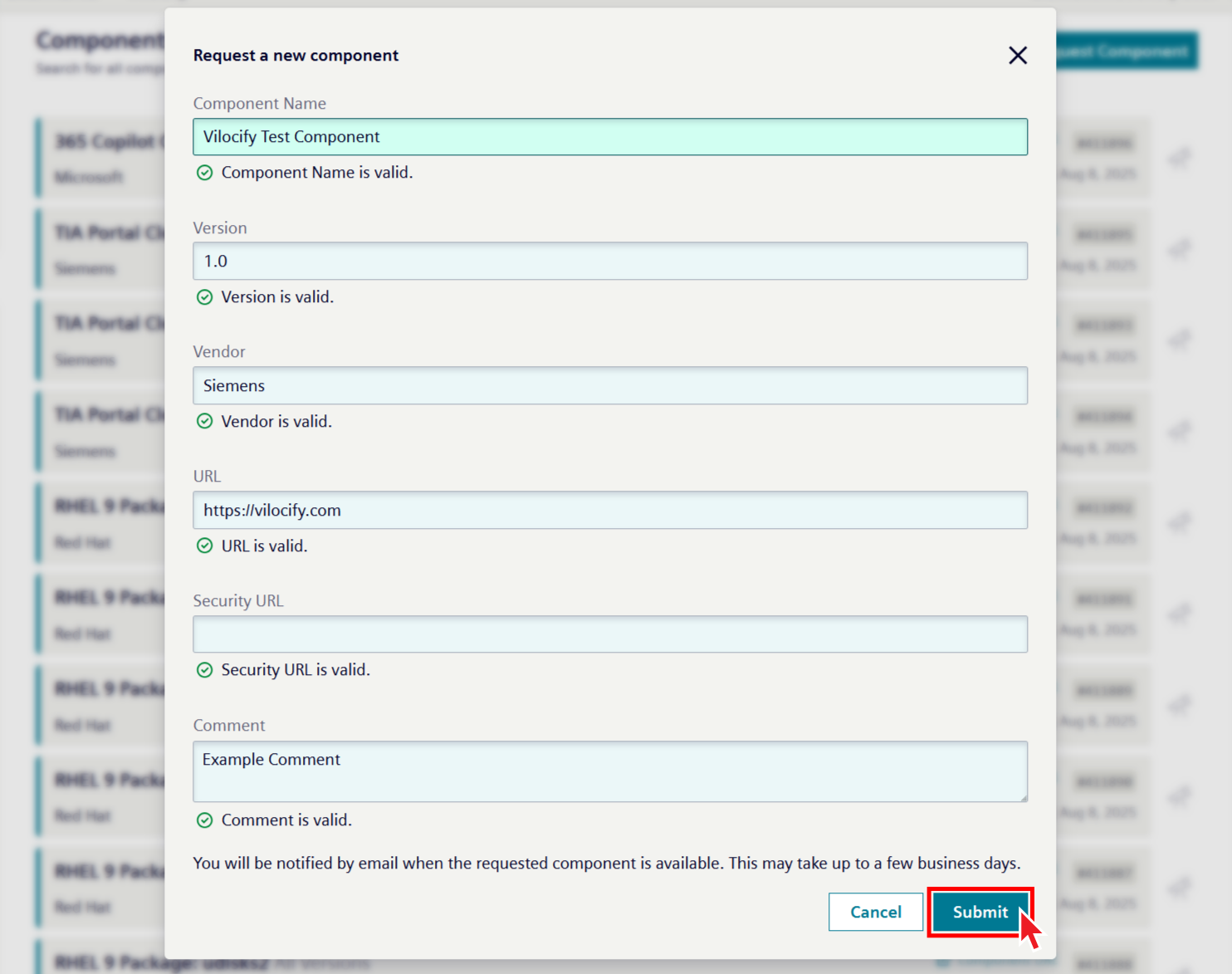
Vendor: The vendor is the company, organization, open source community, or author of the desired component. Some vendors are obvious, for example Microsoft, Oracle, Red Hat, Adobe, Apache, but sometimes it isn't clear how to define the vendor correctly. The following guidelines provide some guidance for such cases:
- If the component wasn't developed by a company, organization or open source community, use the full author name as the vendor, for example Matt Johnston for the component Dropbear.
- If the company, organization, open source community or author is unknown, use the website hosting the component, for example gmplib.org for The GNU Multiple Precision **Arithmetic Library (GMP).
- GitHub, SourceForge, Maven, npm etc. are almost never valid vendors, as they simply are code repositories.
- Use official vendor pages to determine the correct vendor name.
Component Name: The component name is the name used to describe the software / hardware component as given by the vendor. The component name isn't the name of an installation file, download file, binary file or sub-component, that isn't usually .jar, .dll, .exe, .msi files. The following rules are defined to name the "component name" field consistently for all types of components:
- Use the name exactly as used by the vendor to describe the component, for example in official product page or vendor advisories. Avoid component names not coming from official vendor pages.
- The full name should be used but an abbreviation can be added in brackets at the end of the component name. for example
SUN Java Architecture for XML Bindings (JAXB). - There is no need to include the vendor name in the "component name" field usually, only the component name is required for example Windows, not Microsoft Windows.
- Some components are written in different programming languages. In such instance, please specify the desired variety explicitly. Example: Xerces XML Parser (for Java) vs. Xerces XML Parser (for C++).
Version: The version field is for the version of the component. Use the following guidelines for the version field:
- The requested version must exist, and it should be possible to find hints of its existence on the vendor's website.
- The granularity of the requested version should match the granularity of the versions mentioned in official vendor's advisories. For example, it doesn't make sense to register Microsoft Internet Explorer version 11.0.9600.18762 because Microsoft doesn't publish security bulletins on that level of granularity. Instead, Microsoft Internet Explorer 11 should be used.
- It's possible to request a wildcard version to monitor whole branches of a component. This is especially useful for components that receive frequent security updates that change its version. Instead of requesting for example Tomcat 8.0.31, Tomcat 8.0.32, Tomcat 8.0.33, etc. every few weeks, you can simply request Tomcat 8.0.x or even Tomcat 8.x.
- Some components can be installed on various operating system platforms. Please specify the required platform in the version section for example IBM WebSphere Application Server 7.0.0.21 for Windows, Adobe Acrobat Reader for Apple macOS.
- Don't enter multiple versions in the field for one component. A new component for each individual version needs to be created for example the following entry with multiple versions is incorrect: Microsoft Windows 7, 8, 2010 Server. Three new component requests are required: Microsoft Windows 7, Microsoft Windows 8, Microsoft Windows 2010 Server.
- Don't use letters like "v" or "version" in the version field if the vendor of the component doesn't explicitly also use this naming convention. Also don't add additional comments or information which the vendor doesn't use in the version part for example self-compiled bug fixes.
- Relational characters such as
>,<,>=,<=aren't allowed as this may result in an unclear component assignment. - It's possible to request beta versions, release candidates, and so on, in the same manner as any other stable version. However, please note that often times, vendors don't disclose vulnerabilities affecting such versions. As such, using these types of versions might result in a loss of information that's made available for stable versions.
URL: Link to the vendor's page where information about the component can be found. Use the following guidelines for the URL field:
- URL should point to a page where it becomes clear that the requested component (ideally including its version) really exists. If you can't find an official page for the desired component, it might be an indication that the component request doesn't make sense.
- It's usually not sufficient to just add a vendor's top level domain, for example https://www.suse.com/products/server/ should be used instead of just https://www.suse.com/ for the component SUSE Linux Enterprise Server (SLES).
- Avoid using non-official vendor links, for example re-seller sites, Maven or npm links, and so on.
Security URL: Link to a web page where component specific security information like security advisories or security bulletins can be found, for example https://www.suse.com/support/security/ for SUSE products.
Some vendors provide security information only to customers with active support accounts, without making it available to the public. If you request a component (or add one to your monitoring list) where this is the case, please contact us via our Support Portal so we may find a way to access this information. Failing to do so will result in Vilocify monitoring only publicly available information for that component.
Comment: An optional free text field that allows users requesting a new component to add any information that might facilitate the correct processing of the request.
Submitting a component request
Once you have filled in all the mandatory fields you can submit the request form by clicking on "Submit." The requested component won't be immediately visible within the Vilocify Portal. Instead, the Vilocify team will analyze your request, determining whether a reliable vulnerability monitoring is possible with the provided information. Once the Vilocify team processed your request, you will be informed by message in your inbox. If the component request was successfully processed, you will be able to find the corresponding component within our Vilocify Portal, ready to be added to your monitoring lists as needed. In cases where it wasn't possible to add the desired components you will be informed as well, including information about why it wasn't possible to successfully process your request. You are then free to open a support ticket to providing additional information / clarification.
The date on which a component has been added to the Vilocify service is marked in the "Monitored Since" field visible within the Vilocify Portal and the Vilocify REST API. Vulnerabilities published before the "Monitored Since" date of a component might not be assigned to a component, that's the Vilocify service doesn't currently offer retrospective monitoring. You can search for an older version or an "All versions" of that component within Vilocify. If all this doesn't help, you need to search the Internet.